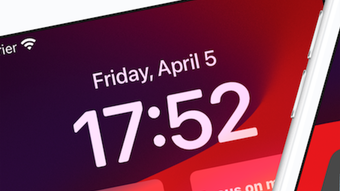

Download 3minders – lock screen notes, reminders, productivity, task management, daily goals
Overview
3minders – Lock Screen Notes is a desktop productivity tool designed to deliver immediate visibility of critical tasks and goals directly on the user’s lock screen. By placing three customizable reminders in plain sight, the application ensures that important information remains top-of-mind, even before the user logs in. This approach is ideal for individuals seeking a simple, distraction-free method to maintain focus on daily priorities.
The app targets both personal and professional users who rely on visual cues to stay organized, including students, remote workers, and goal-oriented professionals. Its core purpose is to bridge the gap between intention and action by making reminders unavoidable and contextually relevant. The developer did not provide additional background information, but the app’s design suggests a focus on minimalism, usability, and aesthetic appeal.
Real-world usage scenarios include setting morning affirmations, tracking daily tasks, or reminding users of upcoming deadlines. The app is available for both Windows and Mac, supporting a broad range of desktop users. Released in April 2024, 3minders represents a fresh take on task management by leveraging the lock screen as a strategic interface for productivity.
Key Features & Capabilities
- Three Lock Screen Reminders – Users can configure up to three personalized notes that appear on the lock screen each time the device is locked. This ensures consistent visibility and reduces the risk of forgetting critical tasks.
- Customizable Wallpapers – The app integrates with Unsplash to provide access to a curated collection of high-resolution, visually appealing images. Users can set any image as their lock screen background to enhance personalization and mood.
- Hand-Selected Fonts – A selection of elegant, readable fonts is available to customize the appearance of the reminder text, allowing users to match their aesthetic preferences while maintaining clarity.
- Task Visibility at a Glance – By displaying reminders directly on the lock screen, 3minders eliminates the need to open additional applications, streamlining access to essential information.
- Simple, Intuitive Setup – The app is designed for quick configuration, enabling users to begin using it immediately after installation without technical overhead.
These features support a workflow where users are reminded of their priorities the moment they interact with their device. For example, a student might set a reminder to “Review notes before exam” and pair it with a calming nature photo, while a remote worker could use the app to track daily goals like “Complete report by 3 PM.” The integration of visual and textual elements enhances retention and motivation, making 3minders a unique tool in the productivity software space.
User Interface, Workflow & Performance
The user interface of 3minders is designed with simplicity and clarity in mind. The main configuration panel allows users to input their three reminders, select a wallpaper from the Unsplash library, and choose a font from the available list. Navigation is straightforward, with minimal menu layers and intuitive controls.
The workflow is streamlined: after installation, users can set up their reminders in under a minute, with no complex onboarding process. The app runs in the background, automatically updating the lock screen display whenever the system locks. Performance observations are based on general software behavior patterns.
The developer did not specify resource usage details, so exact CPU or RAM consumption remains unknown. However, given the app’s lightweight nature and focus on visual display, it is expected to operate efficiently without significant system impact. Stability is assumed to be consistent, as the app functions within the native lock screen environment of Windows and Mac.
No reports of crashes or conflicts were noted in available information. The app’s behavior during screen lock and unlock cycles appears to be seamless, with no noticeable delays or visual glitches reported.
Compatibility & System Requirements
3minders is available for both Windows and Mac operating systems. The latest version is 1.0, released in April 2024. The installation file size is 28.6 MB, indicating a compact and lightweight application.
The developer did not provide additional system requirements, so exact hardware specifications such as minimum RAM, processor type, or disk space are not available. Compatibility information is limited to the supported platforms. It is assumed that the app is compatible with modern versions of Windows and macOS, given its release date and desktop focus.
However, users should verify that their system meets the standard requirements for running desktop applications. The app does not appear to require administrator privileges or third-party dependencies, which simplifies deployment across personal and professional environments.
Pros and Cons
Pros
- Unique lock screen reminder system enhances task visibility and retention.
- Highly customizable with Unsplash wallpapers and hand-selected fonts.
- Simple setup with minimal learning curve.
- Lightweight design with a small file size of 28.6 MB.
- Supports both Windows and Mac platforms.
Cons
- Exact system requirements were not listed by the developer.
- Only three reminders can be displayed at once.
- Customization options are limited to wallpapers and fonts (no advanced formatting).
- Price point of $9.99 may be considered high for a single-purpose tool.
- No indication of cloud sync or cross-device support.
FAQ Section
Is 3minders compatible with my Windows or Mac device?
3minders is designed for both Windows and Mac operating systems. Specific compatibility details beyond the platform level were not provided by the developer.
Is the app secure and safe to use?
The app runs within the standard desktop environment and does not require access to sensitive data. No security vulnerabilities were reported. Users are advised to download the software only from official sources.
How often does 3minders update?
Updates are released as needed. The latest version is 1.0, released in April 2024. Future update frequency was not specified.
What type of license does 3minders use?
3minders is a one-time purchase application. The license allows use on a single device, though multi-device usage policies were not detailed.
Can I use 3minders offline?
Yes, 3minders functions fully offline. The app does not require an internet connection to display reminders or apply customizations.
Final Thoughts + CTA
3minders offers a refreshing and visually engaging approach to task management by transforming the lock screen into a personalized productivity dashboard. Its focus on simplicity, aesthetics, and immediate visibility makes it a compelling choice for users who struggle with task retention or need a constant visual nudge toward their goals. While the app has limitations—such as a fixed number of reminders and a relatively high price for a single-function tool—it delivers on its core promise with elegance and efficiency.
The integration of Unsplash imagery and curated fonts elevates the user experience beyond basic functionality. For individuals who value design and consistency in their daily routines, 3minders stands out as a unique desktop utility. If you're seeking a secure, lightweight, and visually appealing way to stay on track, this app deserves consideration.
Download 3minders now.







